> ## Documentation Index
> Fetch the complete documentation index at: https://docs.sundaypyjamas.com/llms.txt
> Use this file to discover all available pages before exploring further.
# Chat with Your First Agent
> Open the Agents tab and get a real deliverable — a document you can download — in a few minutes.
## This is where work gets done
**Agents** are the main way to use AI Suite. You describe what you want in plain English; the **Core Agent** plans the steps, uses tools when needed, and can hand you a finished **document, spreadsheet, or PDF** — not only a chat reply.
Let's do one task together.
## Step by step
Click **Agents** in the menu on the left. You'll see your sessions on the left, the chat in the middle, and space for a file preview on the right.
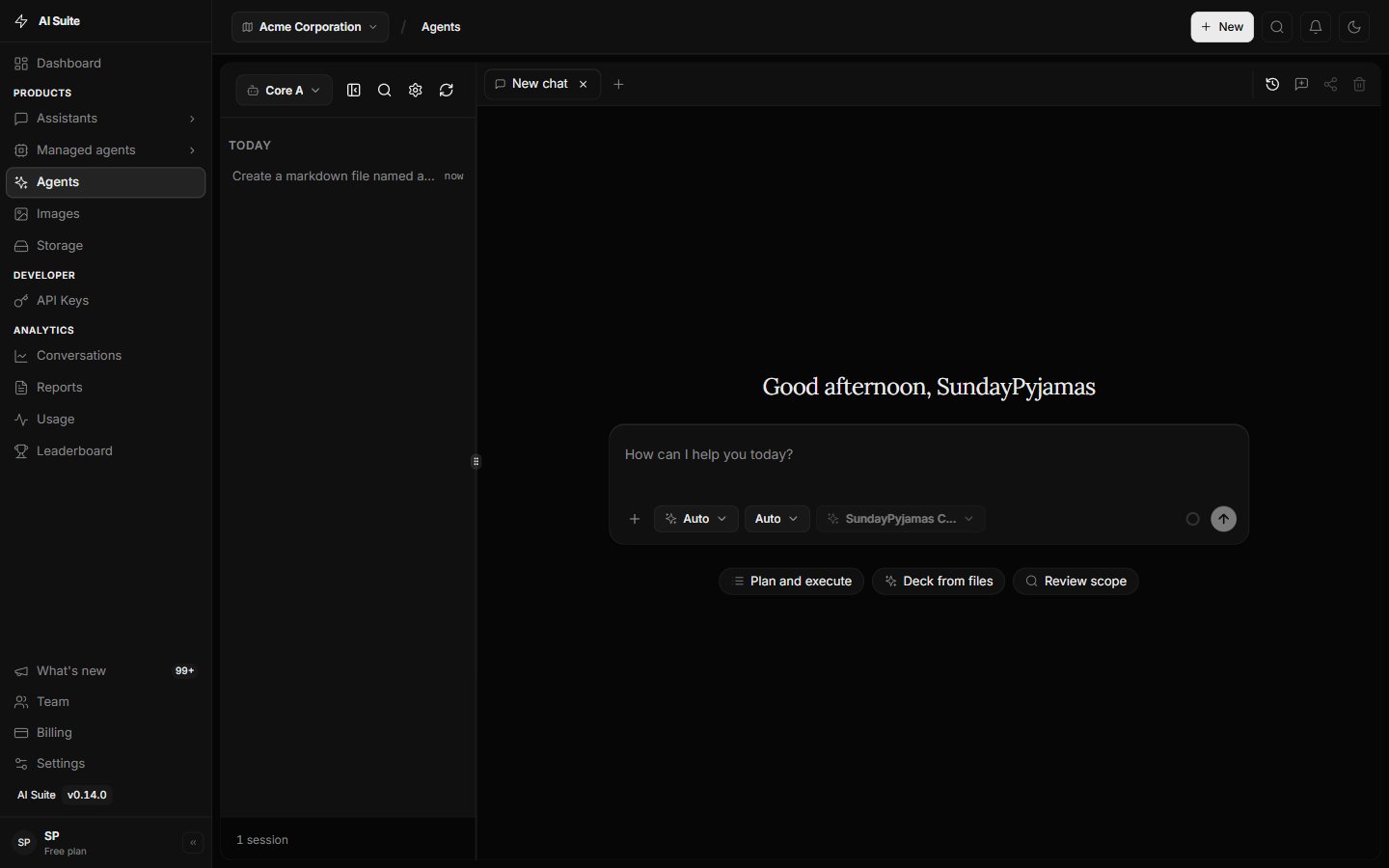 Click **+** (new tab or new chat) so you have a clean session for this task.
Type something concrete. Try copying this:
> *Write a friendly one-page project brief for a coffee shop loyalty program. Include Goal, Audience, Key Message, and Next Steps. Give me a document I can download.*
Name the **outcome** (a downloadable document) and the **sections** you want. Clear outcomes get better results. More tips in [Writing good prompts](/user-guide/writing-prompts).
The Agent may show steps as it goes — drafting, formatting, creating a file. That is normal.
Click **+** (new tab or new chat) so you have a clean session for this task.
Type something concrete. Try copying this:
> *Write a friendly one-page project brief for a coffee shop loyalty program. Include Goal, Audience, Key Message, and Next Steps. Give me a document I can download.*
Name the **outcome** (a downloadable document) and the **sections** you want. Clear outcomes get better results. More tips in [Writing good prompts](/user-guide/writing-prompts).
The Agent may show steps as it goes — drafting, formatting, creating a file. That is normal.
 When a file is ready, it appears in the **preview panel** on the right. Read it, then use **copy** or **download**.
 Stay in the same session and refine:
> *Make the Key Message shorter and add a simple timeline for the next two weeks.*
The Agent remembers the brief and updates the file.
## Try these starter tasks
*"Summarize these notes into a one-page status update I can download: \[paste notes]"*
*"Turn this list into a spreadsheet with columns Name, Owner, and Due date: \[paste list]"*
*"Create a short PDF handout of our return policy in plain language: \[paste policy]"*
*"Draft a 5-step launch checklist as a document I can share with the team."*
## Common questions
No. You can't break the platform by chatting with an Agent. If the result isn't right, ask again in clearer words.
Use [plain Chat](/user-guide/first-chat) for quick Q\&A with no file or tools needed. For real deliverables, stay in **Agents**.
See [Create docs, sheets & PDFs](/user-guide/agents/create-files).
## Next step
Understand what the Core Agent can do — and why it's the center of AI Suite.
Stay in the same session and refine:
> *Make the Key Message shorter and add a simple timeline for the next two weeks.*
The Agent remembers the brief and updates the file.
## Try these starter tasks
*"Summarize these notes into a one-page status update I can download: \[paste notes]"*
*"Turn this list into a spreadsheet with columns Name, Owner, and Due date: \[paste list]"*
*"Create a short PDF handout of our return policy in plain language: \[paste policy]"*
*"Draft a 5-step launch checklist as a document I can share with the team."*
## Common questions
No. You can't break the platform by chatting with an Agent. If the result isn't right, ask again in clearer words.
Use [plain Chat](/user-guide/first-chat) for quick Q\&A with no file or tools needed. For real deliverables, stay in **Agents**.
See [Create docs, sheets & PDFs](/user-guide/agents/create-files).
## Next step
Understand what the Core Agent can do — and why it's the center of AI Suite.